Accessibility is hard to get right with Hyvor Talk because of the many customization options we provide. However, we are working hard on improving accessibility for all users. Here’s our progress.
If you have found any issues with accessibility in Hyvor Talk, please share your feedback below. We promise a fix within 72 hours for any accessibility issues with reviewed components.
Just worked on an accessibility update for Reactions.
Adding some details here for future reference and for others to review.
Unlike ratings, there’s no standard way for the reactions widget. I found a couple of ways to implement accessibility for reactions (a group of buttons). Thanks for the Google Sheet @uhrwebsupport, it helped!
Option 1: Use radiogroup and <input type="radio">
This was the most promising one, as most of the keyboard navigation will be handled by the browser. But, there were two problems:
The browser doesn’t allow deselecting after a radio input is selected (Space doesn’t reverse). This could be solved by using Javascript, but I guess at some point this might confuse users.
Tabbing into the radiogroup focuses the first input, but arrows then select* (focus) the next one.
So, Option 1 didn’t fit right.
Option 2: role="group" with buttons. Make buttons togglable using aria-pressed
There were some issues with this option as well:
Each button can be tabbed into separately. The reactions widget is shown at the top of the page, so it will take a lot of time to go through each button to reach the comments input, which is not what a user might want. Considering this, Option 1 was better, but then, I added some custom logic to handle tabindex:
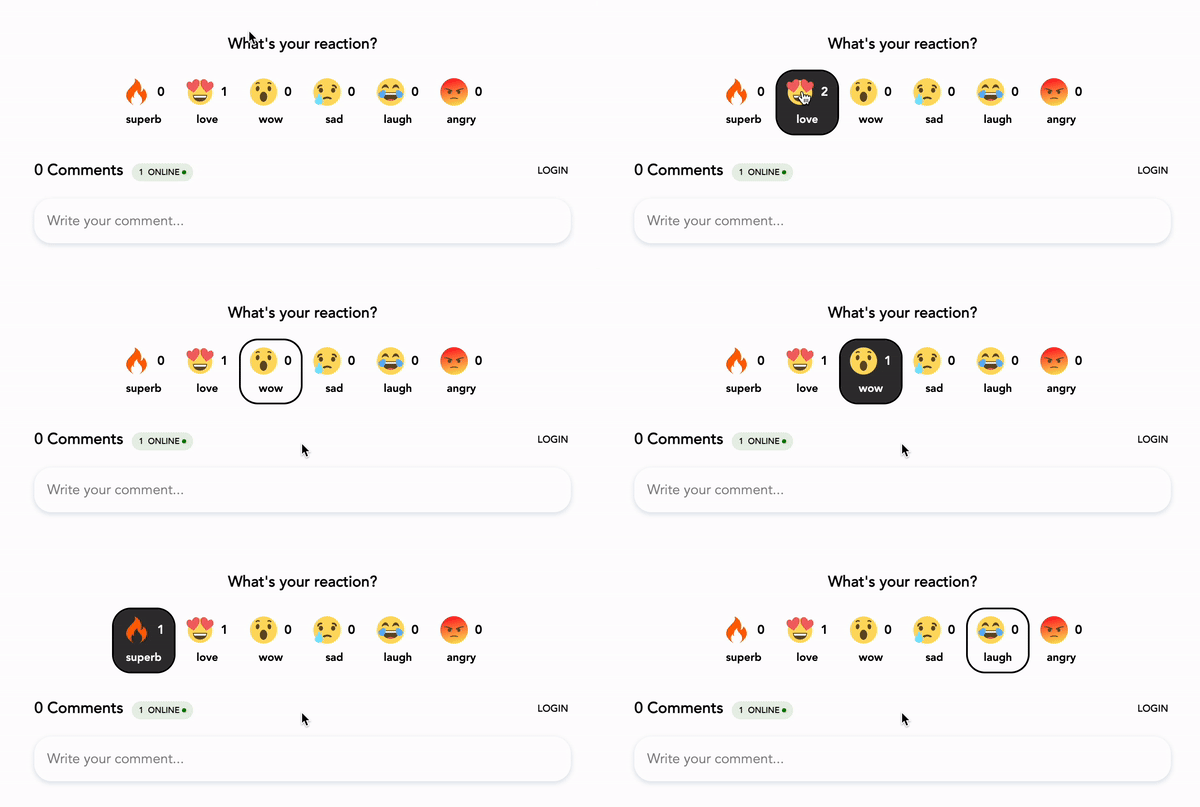
If no reaction is selected, the first reaction can be tabbed into
If a reaction is selected, that reaction can be tabbed into
Arrow keys can be used to navigate
The final result looks like this:
The HTML looks like this now (unrelated attributes removed):
<div
    role="group"
    aria-labelledby="reactions-title"
>
    <div id="reactions-title">What is your reaction?</div>
    <div>
        <button
            aria-label="Wow"
            aria-pressed="false"
            tabindex="0"
        >
            <!-- Image and text -->
        </button>

        <!-- Other buttons -->
    </div>
</div>
We have added
role="group" to the outer element to group everything
aria-labelledby for the title
aria-pressed to buttons to make them togglable (voiceovers work nicely here)
tabindex to handle the “tab into” logic
Probable issues / improvements:
Users might not recognize that keyboard navigation is possible. We may need a hidden i18n aria-describedby element?
Well, custom logic for accessibility is always risky. We may need to update the navigation and tabindex logic based on feedback from real users.
(We haven’t released the update yet, waiting for other accessibility improvements as well)
Hi folks, also just checking in here for updates on the accessibility front as this is becoming more urgent to our continuing use of HT. Any info would be appreciated, thanks!
Just checking in again! We’d love to be expanding our use of HyvorTalk, but I’m worried about shining a light on it and getting flagged for not meeting our accessibility standard and having to stop using it altogether. Any idea when this might be released? Thank you for your commitment to improving the accessibility!
The development part of this is complete. We’ll be releasing it in the next update, which is quite a large one with newsletter/membership features. We expect to release it around the 20th of July.
We’ve added many accessibility improvements to the comments embed with today’s release. All the mentioned issues in the document you linked are now fixed. Let us know if you find anything else.
Thank you for your support in finding these issues.
Hi @supun ! Many thanks for these changes. I resubmitted to our internal accessibility reviewers and they did find some outstanding items with some of the buttons and form fields. You can see their updates to the previous document. I hope these issues are straightforward to address, but please let me know if you have any questions.
@supun Thanks again for your work on the accessibility issues over this past year! I appreciate it, and I hope the feedback is valuable to you in improving the product! Hopefully we can get the rest of these issues addressed in early 2025.
(3) Reaction text. We think this is already fixed because of the use of role=group in the outer element. On Mac, VoiceOver reads it as “wow, toggle button, What’s your reaction, group” which provides enough context.
(5) Role and aria-multiline added to the text input.
(6) This is also already fixed. We use role=group + aria-labelledby, which is essentially the same role used by fieldset.
(7) From our tests, the upvote buttons are also usable from the keyboard (unless we misunderstood something?)
(8) This is fixed as well. We already have for and id for the search.
To all but especially @supun , is there a way to have new comments to the user shown? Also it seems that the view of comments defaults to “Top”, even after it is set to “Newest”, this happens on page refresh. Is there a way to keep it at the user’s selected preference?
Unfortunately, these are still not passing. Our accessibility team updated their report doc.
I also asked the reviewer to respond specifically to the comments you included above. I hope this information is helpful; let me know if you have questions, and I can try to get additional information. I appreciate you working on these issues so that Hyvor Talk can be used and enjoyed by our community members using assistive technology.
(3) Reaction text. We think this is already fixed because of the use of role=group in the outer element. On Mac, VoiceOver reads it as “wow, toggle button, What’s your reaction, group” which provides enough context.
Not fixed. A new issue is introduced as well. The visual text is “18 love” which is pretty vague. Programmatically, the text is “love” without the 18. In this context, a voice command user would not be able to activate the button because they would say “click 18 love” and it would not work. Now to be fair, if I was using voice commands I probably wouldn’t notice the 18 as part of the link and do it correctly, but this is technically a violation as it stands.
(5) Role and aria-multiline added to the text input.
Whats wrong with <textarea> instead of <div>? In its current form, it does not show up as an editable element in the accessibility tree. It sort of works, but not reliably enough in its current form.
(6) This is also already fixed. We use role=group + aria-labelledby, which is essentially the same role used by fieldset.
(7) From our tests, the upvote buttons are also usable from the keyboard (unless we misunderstood something?)
The buttons under “What’s your reaction?” still do not work for keyboard users.
(8) This is fixed as well. We already have for and id for the search.
This I marked as fixed. So they did take care of this element.


 Thanks for responding and for working on these issues!